

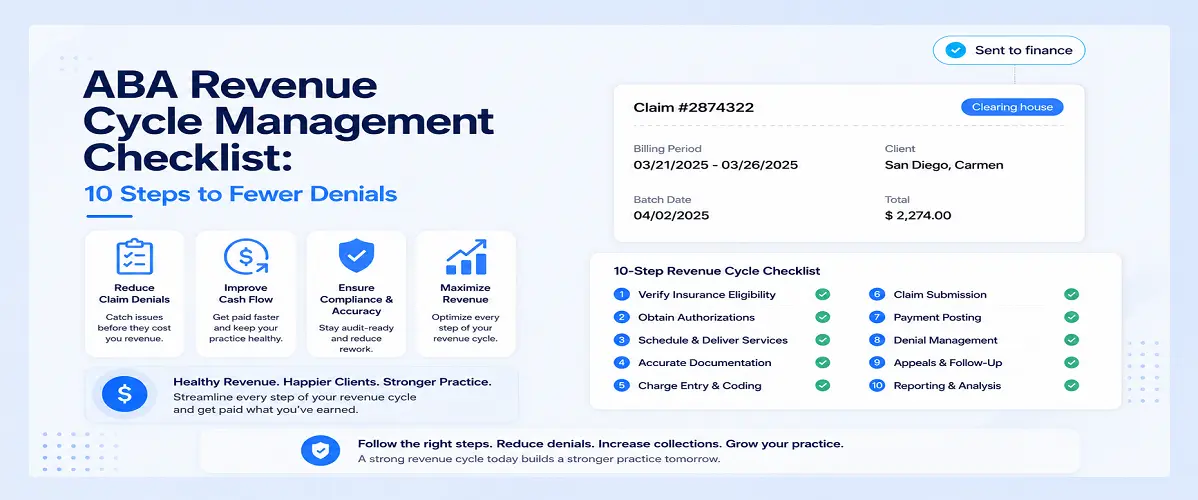
ABA Revenue Cycle Management Checklist: 10 Steps to Fewer Denials
Claim denials cost ABA clinics time and money. Follow this 10-step revenue cycle management checklist to catch errors before they happen.

- Best ABA Practice Management Software: What Actually Works for Busy Clinics - September 26, 2026
- Practice Management Software for ABA Therapists: Features, Benefits & How to Choose - September 23, 2026
- All-in-One ABA Practice Management System: Why It Matters for Growing Practices - September 17, 2026
Billing problems in ABA practices rarely happen all at once. They build slowly a few denials here, some delayed payments there, an authorization mismatch that nobody catches until the claim comes back rejected. By the time it feels like a crisis, the backlog is already significant.
ABA revenue cycle management is the process of making sure that every step between delivering a session and getting paid for it happens correctly and on time. When it works well, you barely notice it. When it breaks down, it shows up fast in your cash flow.
This checklist covers the ten steps where ABA practices most commonly lose revenue and what to do about each one.
Before the Session: Steps 1-4
Most billing problems start before anyone walks into a session room. Getting the front-end right is what makes the back-end manageable.
Step 1: Verify Authorization Before Scheduling
Every client needs an active authorization before services begin. That sounds obvious, but in a busy practice with multiple payers and rolling authorization windows, it’s easy for a session to get scheduled against an authorization that’s expired or already been fully used.
Build authorization verification into your scheduling workflow not as a separate manual check, but as part of the process itself. If scheduling and billing are in the same system, the authorization status should be visible at the point when a session is booked.
Step 2: Load Authorization Details Accurately
The authorization you receive from a payer contains specific information: approved service codes, approved hours, date range, and sometimes location or provider restrictions. All of that needs to be entered correctly into your system.
A common source of denials is a mismatch between what was authorized and what was billed not because the service was wrong, but because the authorization data wasn’t entered accurately in the first place. Assign one person to manage authorization entry and build in a second check before sessions begin.
Step 3: Confirm Staff Credentials and Payer Enrollment
A claim can be denied because the staff member who delivered the service isn’t enrolled with that payer, or because their credential isn’t recognized. This happens most often with new hires who start seeing clients before their credentialing paperwork is complete.
Keep a simple tracker for credentialing status by staff member and payer. Before assigning a new employee to a client, confirm they’re enrolled or know when enrollment is expected to complete.
Step 4: Make Sure Session Documentation Requirements Are Clear
Different payers have different documentation requirements. Some require specific language in session notes. Some want BCBA signatures on every note. Some have minimum content requirements that go beyond what your standard template includes.
If your clinical team doesn’t know what a specific payer requires, the notes they write may not support the claims your billing team submits. This is a coordination problem, not just a billing problem. Make sure documentation requirements are communicated to the staff actually writing the notes.
During and After the Session: Steps 5–7
Step 5: Complete Session Notes Before Claims Go Out
This one seems straightforward, but it’s where a lot of practices lose ground. A session happens, it gets entered in the billing queue, and the claim goes out but the note isn’t complete yet. Some payers will deny a claim if the supporting documentation isn’t in place at the time of submission.
The cleanest solution is to build a rule into your workflow: claims don’t submit until the session note is marked complete. When billing and documentation are in the same system, this kind of gate is easy to enforce.
Step 6: Check Coding Before Submission
ABA billing uses specific CPT codes the 97151–97158 range for adaptive behavior services and the modifiers vary depending on who delivered the service and under what supervision structure. A BCBA billing at the same code as an RBT, or a missing HN modifier where one is required, will produce a denial.
Build a pre-submission review into your billing process. This doesn’t have to be a line-by-line manual check on every claim most billing software can flag common coding errors automatically. The goal is to catch the problem before it goes to the payer, not after.
Step 7: Track Authorization Utilization in Real Time
You know how many hours a client is authorized for. The question is how many of those hours have actually been used and how many are remaining before the authorization runs out.
In practices that track this manually, the check often happens too late. A client runs through their authorized hours, sessions continue, and the resulting claims get denied because there’s no authorization to support them. Staying on top of utilization week by week prevents that scenario.
If your practice serves clients with multiple payers or complex authorization structures, this is one area where software pays for itself quickly. Real-time utilization data should be visible without pulling reports.
Claims and Payments: Steps 8–10
Step 8: Submit Claims Promptly
Most payers have timely filing windows a deadline by which a claim must be submitted after the date of service. Miss that window and the claim is denied, with no option to appeal on clinical grounds.
In practices with large session volumes, claims can pile up if the billing workflow isn’t running consistently. Weekly submission targets or ideally daily submission for high-volume practices keep the pipeline moving and reduce the risk of timely filing denials.
Step 9: Manage Denials as a System, Not Case by Case
Denials are going to happen. The question is whether you have a process for handling them or whether each one gets dealt with individually as it lands.
Effective denial management means categorizing denials by reason, assigning follow-up responsibility, and tracking resolution status. More importantly, it means looking at denial patterns if the same code keeps getting denied by the same payer, that’s a process issue, not a one-off problem.
A denial rate dashboard gives you that visibility without having to pull individual reports. When denials are tracked in the same system as claims and scheduling, patterns become obvious quickly.
Step 10: Reconcile Payments Against Expected Reimbursement
Getting paid isn’t the end of the process. You also need to confirm that what you were paid matches what you were owed. Payers sometimes underpay short-paying a unit count, applying the wrong fee schedule, or applying a contractual adjustment incorrectly.
Payment posting and reconciliation should compare the remittance advice against the original claim. Consistent underpayments by a specific payer are worth investigating and, where appropriate, appealing.
Putting the Checklist Together
Here’s a quick reference version of the ten steps:
Before the session:
- Verify authorization is active before scheduling
- Load authorization details accurately into your system
- Confirm staff credentials and payer enrollment
- Make sure clinical staff know each payer’s documentation requirements
During and after the session:
- Require completed session notes before claims submit
- Review coding before submission
- Track authorization utilization weekly
Claims and payments:
- Submit claims on a consistent schedule
- Manage denials systematically, not case by case
- Reconcile payments against expected reimbursement
None of these steps are complicated on their own. The challenge is maintaining all of them consistently across a full client caseload, especially as the practice grows. That’s where having billing, scheduling, and documentation in a connected system makes the biggest difference not because it eliminates the work, but because it makes each step easier to execute reliably.
If you want to see how a connected system handles this workflow in practice, booking a demo is the most direct way to get specific answers for your clinic’s situation.
FAQs
What is ABA revenue cycle management?
It’s the end-to-end process of managing everything between delivering an ABA session and receiving payment for it including authorization verification, documentation, coding, claims submission, denial management, and payment reconciliation.
What causes the most claim denials in ABA billing?
Authorization issues are the most common cause sessions delivered without a valid authorization, or claims submitted for codes that don’t match what was authorized. Documentation gaps and coding errors are also frequent contributors.
How is ABA revenue cycle management different from standard medical billing?
ABA has its own CPT code set, specific modifier requirements that vary by staff credential and supervision structure, and payer rules that differ significantly from standard medical billing. Generic medical billing tools often don’t handle these requirements well.
How often should ABA clinics review their denial rate?
At minimum, monthly but weekly reviews are more useful for catching problems early. A denial rate above 5–10% typically signals a process issue worth investigating rather than isolated errors.
Can software improve ABA revenue cycle management?
Yes, particularly by connecting authorization tracking, documentation, and billing in one system. When these are separate tools, information gets lost between them and errors are caught late. A connected system can flag issues before a claim goes out rather than after it’s denied.
Revenue cycle problems in ABA tend to be process problems. The same errors repeat because the process that produces them hasn’t been fixed. Working through this checklist step by step and being honest about where your current workflow breaks down is usually enough to identify where the real issues are.
Fixing one or two of the steps above consistently will do more for your denial rate than any single software feature or billing service. Start with the steps that are currently most inconsistent in your practice, and build from there.
